Page Pulse – AI Website Analytics Platform
Track visitors, conversions, clicks, and heatmaps with Page Pulse. Get AI-powered website analytics, real-time insights, unlimited traffic, and a free plan. Perfect for marketers, founders, agencies, and growing businesses.

Page Pulse Review 2026: Features, Pricing, Pros & Cons (Is It Worth It?)
If you’ve ever opened Google Analytics 4 (GA4) and felt overwhelmed by endless reports, complex menus, and confusing terminology, you’re not alone. Many marketers, founders, and website owners want a simpler way to understand what’s happening on their websites without spending hours learning analytics.
That’s exactly where PagePulse positions itself.
Instead of trying to replace every advanced analytics feature available today, PagePulse focuses on delivering the metrics most businesses actually use: visitors, conversions, traffic sources, clicks, heatmaps, and AI-powered insights, all inside a clean and easy-to-understand dashboard.
But is it really a good alternative to Google Analytics? Can it replace tools like Plausible, Clarity, or Hotjar? And is it worth paying for?
In this Page Pulse Review, we’ll take an objective look at its features, pricing, strengths, weaknesses, and who should consider using it.
What Is PagePulse?
Page Pulse is a modern website analytics platform designed for businesses that want actionable insights without the complexity of traditional analytics software.
Instead of navigating dozens of reports, Page Pulse presents the most important website metrics inside a single dashboard. It aims to help users quickly understand:
- Website traffic
- Visitor behavior
- Traffic sources
- Conversion performance
- Button and link clicks
- Heatmaps
- AI-generated recommendations
The platform also supports multiple websites under one workspace, making it particularly attractive for agencies, marketers, and SaaS businesses managing several projects.
Unlike enterprise analytics suites that often require extensive setup and technical knowledge, Page Pulse emphasizes simplicity. According to the company, setup can be completed in just a few minutes by installing a lightweight tracking script.
Key Features
Simple Analytics Dashboard
The biggest selling point of Page Pulse is simplicity.
Instead of overwhelming users with dozens of reports and hidden menus, the dashboard highlights essential business metrics immediately, including:
- Visitors
- Page Views
- Conversion Rate
- Leads
- Bounce Rate
- Traffic Sources
For many website owners, these are the only numbers they need to monitor on a daily basis.
AI-Powered Insights
One feature that differentiates Page Pulse from many traditional analytics platforms is its built-in AI assistant.
Rather than simply displaying raw data, the platform generates insights such as:
- Your best traffic sources
- Pages needing improvement
- Conversion opportunities
- Performance summaries
- Suggested optimization ideas
This can help reduce the time spent analyzing reports manually, especially for users who are not analytics experts.
Automatic Click Tracking
Page Pulse automatically tracks button clicks, links, and calls-to-action without requiring extensive manual configuration.
For landing pages and marketing campaigns, this makes it easier to understand:
- Which buttons receive the most clicks
- Which pages generate the highest engagement
- Where visitors interact most
Conversion Tracking
Conversions are one of the most important metrics for any online business.
Page Pulse allows users to define conversion goals—for example, a thank-you page after a purchase or form submission and monitor conversion performance from one dashboard.
This makes it suitable for:
- Lead generation websites
- SaaS businesses
- Affiliate marketers
- Landing pages
- E-commerce campaigns
Heatmaps
Heatmaps visually display where visitors click and how they interact with a webpage.
Instead of guessing which sections attract attention, heatmaps provide a visual representation of user behavior.
This feature can be valuable when optimizing:
- Landing pages
- Sales pages
- Product pages
- Lead generation forms
Keep in mind that heatmaps are available only on selected paid plans.
Multi-Site Management
Managing several websites usually means logging into multiple analytics dashboards.
Page Pulse simplifies this by allowing users to monitor multiple websites within a single workspace.
This is especially useful for:
- Digital agencies
- Freelancers
- Portfolio owners
- Marketing teams
- Businesses with multiple domains
Team Collaboration
Unlike many analytics tools that charge per additional user, Page Pulse includes collaboration features that make it easier for teams to work together.
Users can:
- Invite teammates
- Add notes
- Share observations
- Collaborate on website performance
For agencies working with clients, this could simplify communication around campaign performance.
Lightweight Tracking Script
Website speed remains an important factor for both user experience and SEO.
Page Pulse states that its tracking script is lightweight, around a few kilobytes, and is designed to minimize performance impact compared to combining multiple analytics and tracking tools.
While every website setup is different, the focus on keeping the tracking script small is a positive design choice for performance-conscious site owners.
Pricing
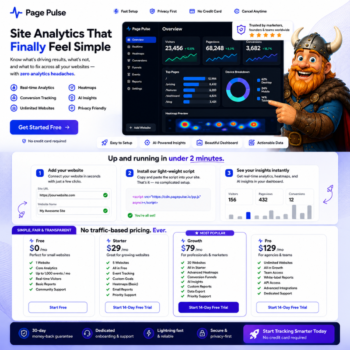
One of Page Pulse’s strongest selling points is its straightforward pricing structure. Unlike some analytics platforms that increase costs based on traffic volume, Page Pulse includes unlimited traffic on all plans and primarily differentiates plans by features, pages, AI insights, and data retention.
| Plan | Price | Best For |
|---|---|---|
| Free | $0/month | Beginners and personal websites |
| Starter | $29/month | Solo creators and single-site businesses |
| Growth | $79/month | Growing marketing teams |
| Pro | $129/month | Businesses needing advanced analytics and collaboration |
| Scale | $199/month | Agencies and multi-site portfolios |
The Free plan allows users to explore the platform without entering a credit card, making it easy to evaluate whether the tool fits their workflow before upgrading.
Page Pulse vs Google Analytics
| Feature | Page Pulse | Google Analytics 4 |
|---|---|---|
| Ease of Use | ⭐⭐⭐⭐⭐ | ⭐⭐☆☆☆ |
| Dashboard | Simple & Clean | Advanced |
| AI Insights | ✅ Built-in | Limited |
| Heatmaps | ✅ Available on paid plans | ❌ No |
| Click Tracking | ✅ Automatic | Requires setup |
| Multi-site Management | ✅ | Limited |
| Learning Curve | Low | High |
| Unlimited Traffic | ✅ | ✅ |
Google Analytics remains one of the most powerful analytics platforms available, especially for large organizations with advanced reporting requirements. However, its extensive feature set can feel overwhelming for users who only need clear answers about website performance.
Page Pulse takes a different approach by focusing on simplicity and speed. Rather than offering hundreds of reports, it emphasizes the metrics most marketers review every day, making it an appealing choice for users who want faster insights with less complexity.
Pros & Cons
Pros
- Clean and beginner-friendly dashboard.
- Fast setup with a lightweight tracking script.
- Unlimited traffic across all plans.
- AI-powered insights and recommendations.
- Built-in heatmaps on supported plans.
- Automatic click and conversion tracking.
- Multi-site support.
- Team collaboration features.
Cons
- Advanced enterprise-level reporting may not match platforms like Google Analytics.
- Some features, including heatmaps and extended data retention, require paid plans.
- As a newer platform, it has a smaller ecosystem and fewer third-party integrations than long-established analytics solutions.
Who Should Use Page Pulse?
Page Pulse is best suited for:
- Affiliate marketers.
- Bloggers and content creators.
- SaaS businesses.
- Small to medium-sized companies.
- Marketing agencies.
- Freelancers managing multiple websites.
- Landing page optimization.
- Lead generation campaigns.
If your primary goal is to quickly understand where your visitors come from, how they behave, and which pages convert best, Page Pulse offers a streamlined experience.
Organizations with highly specialized analytics requirements or deeply customized reporting workflows may still prefer a more advanced platform such as Google Analytics.
Is Page Pulse Worth It?
Based on the features currently offered, Page Pulse presents an attractive option for users looking for a modern, user-friendly analytics platform.
Its combination of:
- AI-powered insights
- Conversion tracking
- Heatmaps
- Multi-site management
- Lightweight implementation
- Straightforward dashboard
makes it particularly appealing to marketers, founders, and agencies that value clarity over complexity.
While it may not replace every advanced capability found in enterprise analytics tools, it successfully targets users who want meaningful insights without spending hours navigating reports.
Frequently Asked Questions
Is Page Pulse free?
Yes. A free plan is available with core analytics features, making it possible to evaluate the platform before upgrading.
Can PagePulse replace Google Analytics?
For many bloggers, marketers, startups, and small businesses, it can provide the essential metrics needed for day-to-day decision-making. Larger organizations with highly specialized analytics needs may still benefit from Google Analytics’ broader feature set.
Does Page Pulse support multiple websites?
Yes. Depending on your subscription plan, you can manage multiple websites from a single workspace.
Does Page Pulse include heatmaps?
Yes, heatmaps are available on supported paid plans.
Does Page Pulse slow down websites?
According to the company, its tracking script is lightweight and designed to minimize performance impact. Actual performance will depend on your site’s overall setup and the other scripts you use.
Is Page Pulse suitable for agencies?
Yes. Features such as multi-site management, collaboration tools, and shared workspaces make it suitable for agencies managing several client websites.
Final Verdict
Based on publicly available features, pricing, and product information, Page Pulse stands out for focusing on simplicity rather than overwhelming users with complex reports. It combines website analytics, conversion tracking, click tracking, heatmaps, and AI-powered insights into a clean, user-friendly dashboard designed for marketers, founders, and growing businesses.
While it may not replace every advanced analytics workflow, it offers an accessible alternative for users who want clear, actionable insights without the learning curve often associated with traditional analytics platforms.
Editorial Rating: 4.6/5 ⭐
This editorial rating is based on publicly available features, pricing, usability, and overall value not on independent hands-on performance testing.
| Category | Rating |
|---|---|
| Ease of Use | ⭐⭐⭐⭐⭐ |
| Features | ⭐⭐⭐⭐☆ |
| AI Insights | ⭐⭐⭐⭐⭐ |
| Pricing | ⭐⭐⭐⭐☆ |
| Value for Money | ⭐⭐⭐⭐⭐ |
| Overall | ⭐⭐⭐⭐⭐ (4.6/5) |
Call to Action
If you’re looking for a simpler alternative to traditional website analytics platforms, Page Pulse is worth considering, especially if ease of use, real-time insights, and built-in heatmaps are your priorities.
You can start with the free plan to explore its features and determine whether it fits your workflow before upgrading to a paid subscription.
This article contains affiliate links. If you sign up through our links, we may earn a commission at no additional cost to you. This helps support VikingDeal and allows us to continue publishing honest reviews and software recommendations.